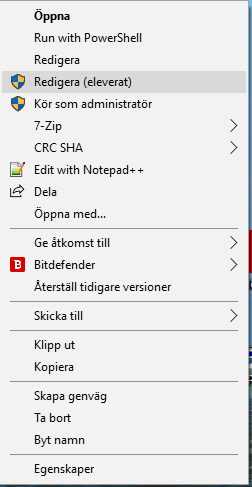

I wanted to get into ISE elevated directly from the shell by just rightclicking the *.ps1 file and then choose to edit …
I realy couldnt find anywone that had made this available public 100% working… so here it is… my verison…
Create a regfile of the below and run it or edit the registry directly…
Windows Registry Editor Version 5.00

    [HKEY_LOCAL_MACHINE\SOFTWARE\Classes\Microsoft.PowerShellScript.1\Shell\Edit(Elevated)]
    @="Redigera (eleverat)"
    "HasLUAShield"=""

    [HKEY_LOCAL_MACHINE\SOFTWARE\Classes\Microsoft.PowerShellScript.1\Shell\Edit(Elevated)\Command]
    @="c:\\windows\\system32\\windowsPowerShell\\v1.0\\powershell.exe -command \"& {start-process -Filepath \"c:\\windows\\system32\\windowsPowerShell\\v1.0\\\\powershell_ise.exe -Verb RunAS %1\"}"
Result