
CMAK – x86 on x64

CMAK

Om man installerar CMAK på en windows server x64 så kommer den INTE kunna generera gilltiga x86 installations paket.
Detta går numera att manuellt justera.

Enkla steg för det egna minnet….
Man behöver ändra i *.sed filen för projektet samt kopiera in 2 filer från en x86 installation samt köra en special build sträng… se nedan..

#1 Skapa en profil enligt konstens alla regler… (hum)
#2 Från en eleverad kommandopromt, skapa en katalog i386 under rätt sökväg till CMAK (tex. c:\program files\CMAK\supporten-US\i386) .
#3 Kopiera dit de 2 filerna från i386 instalaltionen… deär ’advpack.dll ’ & ’cmstp.exe’ (oftast finns dessa filer i c:\windows\system32 på en x86 maskin med installerad profil) Eller i en gammal VPN x86 fil.
#4 Gör en kopia av *.sed filen till typ *-x86.sed (C:\Program Files\CMAK\Profiles\Downlevel* ) och öppna den nya filen i notepad
#5 Editera filen så följande sökvägar till våra nya x86 filer stämmer… ändra följande…
´┐¢
FILE0=C:\Program Files\CMAK\Supporten-US\i386\advpack.dll
FILE1=C:\Program Files\CMAK\Supporten-US\i386\cmstp.exe
TargetName=profile-x86.exe´┐¢

#6 Skapa lösningen…CMAKen gör detta med en x64bitars process så resultatet kommer inte fungera … vi måste göra det manuellt…
ställ dig i den nyligen skapade i386 katalogen
cd C:\Program Files\CMAK\Supporten-US\i386

skapa filen med c:\windows\syswow64\iexpress /N profile-i386.sed

(Iexpress är en self extracting self installing packeterare i windows)

Nu har vi en fungerade x86 CMAK profil genererad från en x64 maskin….

Enjoy…
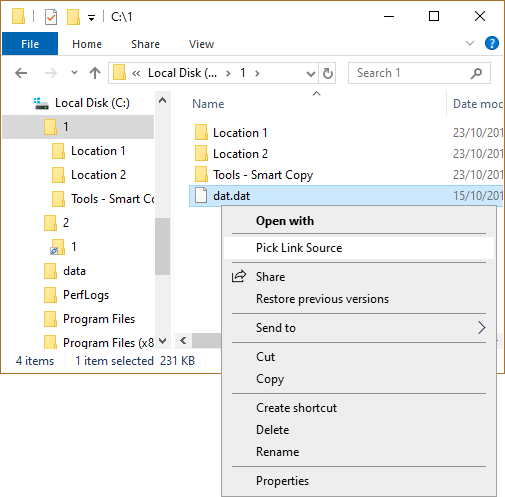
Link Shell Extension AKA Shotcut +++ :O

Link Shell Extension. AKA Shotcut +++ !?!

Site med mjukvara för att kunna göra junctions m.m.
DVS du kan nu ha en fil på ett ställe (läs c:\test) för att enkelt kunna hantera den… sedan tex…
publisera filen i WordPress under katalog genom att helt enkelt … ja vad kallar man det.. .”junka !”? … mappen till rätt ställe…

Finns inte stöd för Windows server 2008 R2 … men Dock Windows 7… Strange…. låt oss testa ….
Update!

Junctions are wormholes in the tree structure of a directed graph. By browsing a Junction a maybe far distant location in the file system is made available. Modifying, Creating, Renaming and Deleting files within a junction tree structure operates at the junction target, i.e. if you delete a file in a Junction it is deleted at the original location.

Symbolic Links are to files what Junctions are to folders in that they are both transparent and Symbolic. Transparency means that an application can access them just as they would any other file, Symbolism means that the data objects can reside on any available volume, i.e. they are not limited to a single volume like Hardlinks. Symbolic Links differ from Shortcuts in that they offer a transparent pathway to the desired data object, with a shortcut (.lnk), something has to read and interpret the content of the shortcut file and then open the file that it references (i.e. it is a two step process). When an application uses a symlink it gains immediate access to the data object referenced by the symlink (i.e. it is a one step process).

Hello world!

Hejsan och välkommen till denna test av WordPress

Meningen med denna Test är att se hur man enklast kan skaffa sig en enkel plats för att logga info från all världens hörn.
En egen info bank för it-branchen hel enkelt… lets go… 🙂

(Helt producerad / Hostad hos BData avdelning #2)

ICE

Alien ICE