
Visa och överföra FSMO-roller i Windows Server 2003

FSMO-roller

I en skog finns det minst fem FSMO-roller som tilldelas till en eller flera domänkontrollanter.
De fem FSMO-rollerna är:

Schemahanterare: Domänkontrollanten som är schemahanterare styr alla uppdateringar och ändringar av schemat. För att kunna uppdatera schemat för en skog måste du ha tillgång till schemahanteraren. Det kan bara finnas en schemahanterare i hela skogen.

Domännamngivningshanterare: Domänkontrollanten som är domännamngivningshanterare styr tillägg och borttagning av domäner i skogen. Det kan bara finnas en domännamngivningshanterare i hela skogen.

Infrastrukturhanterare: Infrastrukturhanteraren ansvarar för att uppdatera referenser från objekt i sin domän till objekt i andra domäner. Vid ett givet tillfälle kan det bara finnas en domänkontrollant som fungerar som infrastrukturhanterare i varje enskild domän.

RID-hanterare (Relative ID): RID-hanteraren ansvarar för bearbetning av RID-poolsförfrågningar från alla domänkontrollanter i en viss domän. Vid ett givet tillfälle kan det bara finnas en domänkontrollant som fungerar som RID-hanterare i domänen.

PDC-emulator: PDC-emulatorn är en domänkontrollant som annonserar sig själv som primär domänkontrollant (PDC) till arbetsstationer, medlemsservrar och domänkontrollanter med tidigare versioner av Windows. Om domänen till exempel innehåll
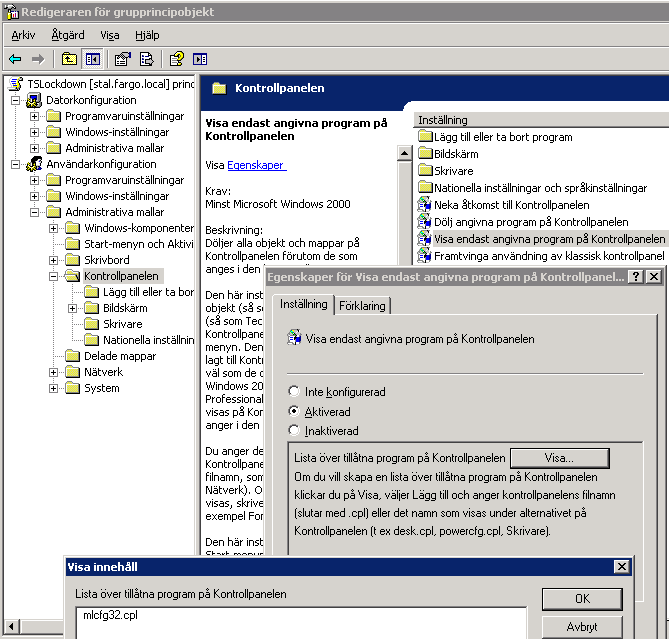
via Visa och överföra FSMO-roller i Windows Server 2003.

HOWTO: Update Linksys PAP2 Firmware

PAP2 Firmware Update

Easiest way to do this is via the ”upgrade URL,” the syntax for which is https://IPofPAP2/admin/upgrade?protocol://IPofServer/pathto.bin where [protocol] is http or tftp.

So, pasting ”https://192.168.2.20/admin/upgrade?https://192.168.2.10/spa.bin” into your browser would tell the PAP2 at 192.168.2.20 to download and install the firmware bin file located at https://192.168.2.10/spa.bin.

Please note binx is evidently NOT supported name syntax…. just rename it to bin…

Vista/Win7 Virtual Store

File System and Registry Virtualization

As mentioned previously, many legacy Windows applications were created so you could access parts of the file system and registry that are now locked in Windows Vista, and many of these applications are not being immediately updated. However, Microsoft has devised an interesting solution within Windows Vista to provide backward compatibility so that legacy software still works.

If legacy applications attempt to access protected portions of the file system and registry without the proper permissions, UAC virtualization services silently redirect read and write operations from protected portions of the file system and registry to unprotected user-specific locations. This process is transparent to legacy software and occurs automatically.

Virtualization Example

For example, take a legacy software application that attempts to write to a configuration INI file located in:

C:\Program Files\<application>\Setup.ini

Windows Vista automatically detects that you do not have permission to save to that location. Windows Vista then copies the file (if it already exists) to:

C:\Users\<your_account>\AppData\Local\VirtualStore\Program Files\<application>\Setup.ini

Windows Vista then allows the write operation to succeed at the new file in the VirtualStore folder. Subsequent read and write operations for that file will always use the file copy located in the VirtualStore folder. However, the application will continue to believe that it is accessing the Program Files directory

For most cases this solution is sufficient, but it is not perfect. Data that the application thinks is globally accessible now becomes private to the user and almost invisible to other applications unless they also have virtualization enabled (typically only other legacy applications). Some applications will see one file, and some the other. If the application later tries to delete the INI file, the delete will appear to succeed, yet the file will still exist in the Program Files directory and remain visible to the application. If it retries the delete, an access denied exception will be thrown.

Although the majority of legacy applications run with virtualization, it is a short-term measure, not a long-term solution. Microsoft has already warned that you should not depend on virtualization being a part of future Windows releases after Windows Vista.